Category: tech enthusiasm

Total 120 Posts

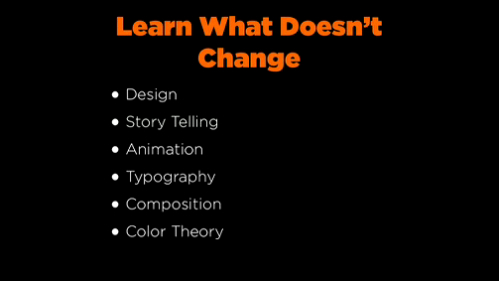
Learn What Doesn’t Change

Two minutes into his MGFest 2009 presentation How To Be Creative And Get Paid, Nick Campbell summarizes my concerns about cigotie’s technically proficient mimicry.

Campbell tells the crowd to learn what doesn’t change.

design, storytelling, animation, typography, composition, color theory

We are awash in shiny cheap tools, a reality which is both wonderful and maddening. These creative disciplines have changed very little in the last several centuries and yet when edubloggers talk about creativity in 21st-century schools they talk overwhelmingly of the tools and, occasionally, of who found the tool first.

I paint with a broad brush here but for every 100 posts celebrating the easy-bake aesthetic of Wordle and Animoto you’d think I could find one celebrating the use of color toward easier, more satisfying communication.

Just gotta make it look new maybe. Like maybe we lose some vowels, rename it colrthry or something. We’ll give it a logo with a gradient, add some social networking functionality, and if our district IT guy blocks it maybe then we’ll start talking about what’s more important to art than the tools we use to make it.

Liberal Arts 2.0

This Snarkmarket post, proposing an updated liberal arts degree for the 21st-century, would seem to be up the alley of everyone on my reading list:

I think the best way to think about this is not to think of the โ€œnewโ€ liberal arts as supplanting the โ€œold,โ€ but as a complementary set, like painting, architecture, and sculpture as the new, humanist plastic arts during the Renaissance. Like the trivium and quadrivium, we have the octet of โ€œmodernโ€ liberal arts and a set of newer concerns.

They’re looking for contributors to a book.

Asilomar #8: Making Math Movies

Session Title

Digital Story Telling With Mathematics

Better Title

I Just Came From The CUE Conference And It Was AWESOME

Presenter

Brian Van Dyck, math coach, Santa Clara, Google Certified Educator

Narrative

His thesis went: kids spend a million hours per day gaming, texting, blogging, e-mailing, chatting, so you should give them the opportunity to express themselves digitally in your math classes. Brian demonstrated equipment and software and played examples and gave a lot of respect to typical concerns of access (many of the utilities are free as in beer) and time (assign the projects after class for extra credit), which was all good.

Concerns:

How do we assess this stuff? If we believe that a video explanation of fractions is sufficient demonstration of fraction mastery, then that needs a more meaningful place in our grading schema than “token extra credit.” This is easy if you break your grades out by standard. Otherwise, how?

At what point do we care if these digital stories are any good? I really hope more teachers make this an option for their students, if only so our focus might then shift from “let’s get kids doing this” to “let’s get kids doing this well.”

Put another way: If you’re going to accept all manner of digital expression in your classroom, what is your obligation to know good expression from bad expression? I mean, I dunno, do you subscribe to any design feeds? Have you taken a class on photography? Do you know what separates good videography from lousy videography? How much should you care about issues of quality? Does your emphasis on multiple disciplines demand multidisciplinary expertise?

Eventually we need to stop framing this as a technical challenge. The challenge is creative.

Visuals

The only person, to my eyes, who used Keynote. Plus QuickTime movies and a lot of screenshots. Student response systems for surveys.

Handouts

Tri-fold paper with biographical info, web pages, some brief notes.

Homeless

  • He told a truly fantastic story about the time his business calculus professor took him out for pizza and in two hours taught him all the math he needed from pre-K to college. Alas, he didn’t elaborate and the window for a question closed.
  • Animoto goes unmentioned and I owe my Twitter followers $10 apiece.
Asilomar #4: PowerPoint โ€” Do No Harm

Session Title

PowerPoint: Do No Harm

Better Title

Something Provocative To Compensate For My Total Anonymity At This Conference

Presenter

Dan Meyer

Narrative

Nothing I haven’t already inflicted on my regular readers, though the structure here fell along the following lines:

  1. general benefits of storing curriculum digitally (easy, cheap access; portability; better classroom management)
  2. very easy ways to kill your kids with PowerPoint (lousy graphic design, cheap solutions for visual engagement)
  3. very easy ways to counteract the very easy ways to kill your kids with PowerPoint (simple, sound graphic design)
  4. lesson plans built from a single compelling image and a single compelling question (if you have paid even a little attention to our What Can You Do With This? segment, you know where this went)

The room was set for 30. I printed 54 handouts, which sounds optimistic under any circumstance and downright delusional if you’ll recall the turnout to my last presentation. Still, I passed them all out and people sat on the floor.

It was exhilarating, really. I would say something I thought was pretty insightful or smart or whatever and someone from the audience would offer something which made my thing smarter and more insightful.

I was shocked that 100% of the times I asked the audience to journal their thoughts or share them with a neighbor they obliged. This is because I teach freshmen.

I would like to deliver this presentation to other audiences, particularly to new and preservice teachers. My e-mail address, if you’re interested, is dan@mrmeyer.com.

Special Guest Star

  1. OMG Michael Serra!

Visuals

Handouts

I tossed the handouts from my last conference and built them from scratch, guiding my design by The Rule of Least Power. I’m happy with the result and they functioned, more or less, exactly as I intended


PowerPoint: Do No Harm โ€“ Handouts from Dan Meyer on Vimeo.

Homeless

  • This may be impossible to determine but I wonder about the difference between a) how one of my session attendees experienced this content (ie. in one ninety-minute burst) and b) how one of my readers has experienced this content (ie. distributed over many posts and many months with many revisions along the way). If you have experienced the content both ways, please weigh in. Otherwise, you’re welcome to speculate.
  • One laptop in the crowd. No wireless. So much for that wiki.

Asilomar #2: Geogebra

Session Title

Visualize Algebra & Geometry Concepts With The Greatest Of Ease

Better Title

Geogebra Geogebra & Geogebra Geogebra With The Geogebra Of Geogebra

Presenter

Bill Lombard, Teacher [site & PowerPoint presentation]

Narrative

I downloaded Geogebra a million years ago and recognized immediately its value as a free alternative to Geometer’s Sketchpad but I shelved it in my Applications folder and didn’t touch it after that. Like I tweeted during the session, I’m probably the last person in the fifty states to get with this killer program, which lets you create geometric figures, intersect them, drag them, and watch the system change on the fly. This session served one invaluable purpose:

Bill Lombard sat me down for 90 minutes and forced me to play. He demoed the program and I just followed along.

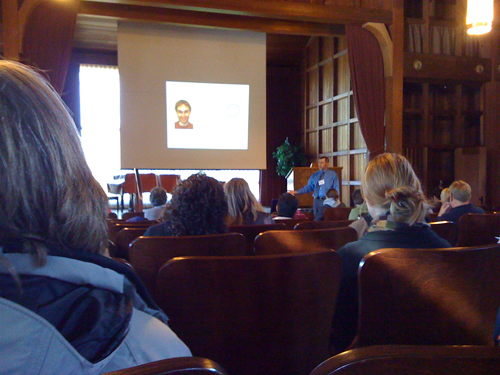
This was a presentation, not a workshop, though, which put Bill Lombard in a difficult position. How do you convey the power of dynamic software when you’re just one guy using it at the front of the Asilomar chapel.

His solution was to ask for audience input and query at every turn.

“What color do you want this line?”

“What shape should we draw next?”

“What would be a good variable for this slope slider?”

Etc.

It was great. People gasped at various intervals, and I’m 99% sure I heard someone muffle a sob somewhere behind me, the software is just that beautiful.

Visuals

Combination PowerPoint & software demonstration.

Handouts

A tri-fold paper (not the only time I saw this format) useful mostly as a link to his personal site.

Homeless

  • A tall gangly guy walked in late and Lombard called him out in front of the entire crowd, “Hey, Guy! Hey, everybody, this is Guy Foresman.” Lombard continued with an oddly passive-aggressive introduction and the awkwardness of the moment was so overwhelming I seem to have repressed the memory. I vaguely recall Lombard telling everyone that Foresman is trying to turn this awesome, free, open source software into a lame, proprietary, end-user product. Foresman sat down, chagrined. It was like I was six and my parents were fighting.