From my experience, educators just aren’t a funny group. Those who aren’t self-serious exert too much effort, firing off puns, confusing goofiness for wit. It isn’t a bad niche they carve out for themselves and, let’s be honest, on the list of Essential Teaching Virtues, “funny” ranks pretty far down the list.
I only became objectively funny my senior year of high school. I spent every year before that one watching, testing, and failing, my m.o. for every skill I’ve developed since birth. Here, in what’s gotta be one of the most gratuitous / self-congratulatory teaching seminars ever to hit the ‘Tubes, I offer three notes:
-
Become Indifferent To Your Audience’s Reaction
By my senior year I had at long last topped out at 6’7”. (2m for anyone outside the US, Liberia, or Burma.) Consequently, I stopped tripping over desks, tripping over my feet, tripping over invisible stuff. I experienced a surge of self-confidence which made me care a little less how my classmates perceived me.
Nothing kills a joke deader than someone’s desperation for approval. Me, I had to stop growing. However you do it, make sure it doesn’t matter to you if they don’t laugh.
-
Share Only What Makes You Laugh
This makes step one a heckuva lot easier ’cause, worst case, you have a good time; best case, someone else has a good time too. It also makes the whole funny thing seem effortless, which is a high priority.
-
Don’t Cue Your Audience’s Reaction
Here’s one of the most cloying movie trailers in my recent memory for what I have little doubt is an equally cloying movie: Dan In Real Life.
The most grating element in a storm of grating elements comes halfway through. Dane Cook’s sister makes a limp joke at the expensive of his illiteracy.
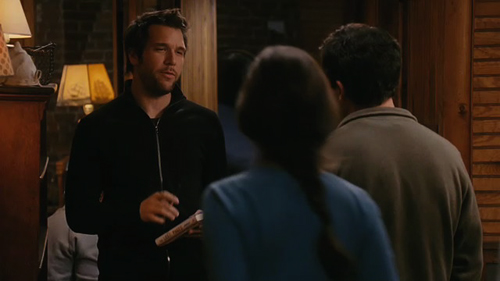
CUT TO: some other scene, the family bursting into spontaneous laughter, like, whooping laughter, the kind that could set off a chain of embolisms around the table, at something else entirely.
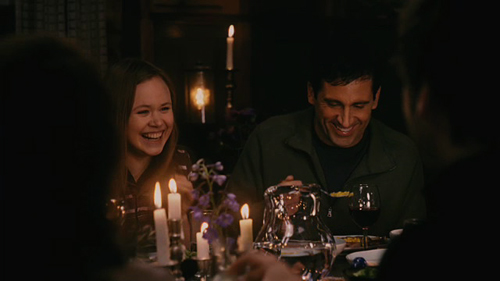
That joke-laughter cutaway is a truly desperate maneuver. A lot of folks won’t mind it. But those folks will find you amusing no matter what you do. The folks who can darken an audience’s collective mood (talking about Gladwell’s Mavens here) this will drive them up the wall.
You’re nudging them in the ribs, whispering “geddit?” telling them how to think, feel, and react. This is a buzzkiller and a dealbreaker in what should be an effortless transaction.
Maybe you don’t have a laugh track but maybe in your mental script you’ve got a line reading “pause for laughter” one which you signal with an involuntary “… um …aha … heh …” and some nervous laughter.
Rather breeze right by it. Onto the next.
There are a lot of practical, workmanlike applications of humor in the classroom. You get those indifferent kids, sullen and detached, suspicious of any teacher evincing warmth. In these situations, you have to retract.
If you’re a desperate humorist around those kids (the exact opposite of the indifferent joke-teller you oughtta be) they won’t just find you unfunny, they’ll find you alienating.
Instead, you sidle up nearby ’em and carry on an interesting and funny conversation with the kid just past ’em. You drop something witty on the other kid, totally indifferent to the real target here. Resist the temptation to look, but from the corner of your eye, notice the kid chuckling a bit. Strange though it sounds, through your indifferent humor, she has found something completely kindred.
Update: Scott knocks down my entire post with one well-aimed paragraph. Currently blocking his i.p. address.
Kids are like most everyone in that it doesn’t matter how someone tells a joke,but it REALLY matters who tells it. Nobody is going to laugh at something when they think it will put them in the position of looking like a dork. People will only laugh when it makes them seem associated with a person that they consider to be highly admired by others around them… it makes them look like they are in on something that no one else is. In other words, if you read this blog post hoping to learn how to be funny, then you probably shouldn’t try it. Just stick to teaching.