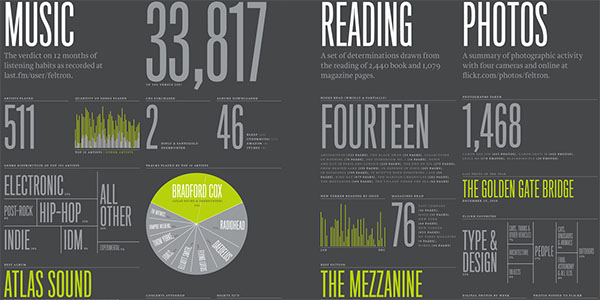
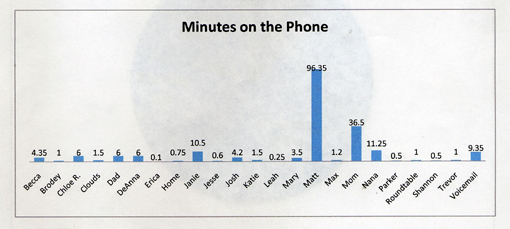
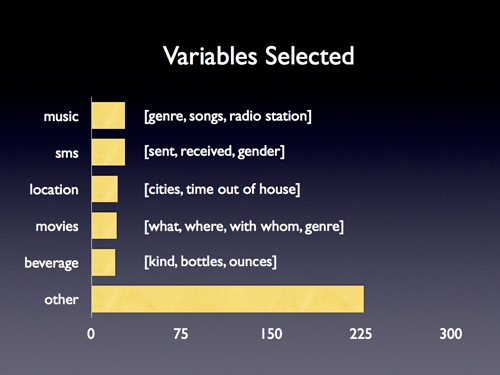
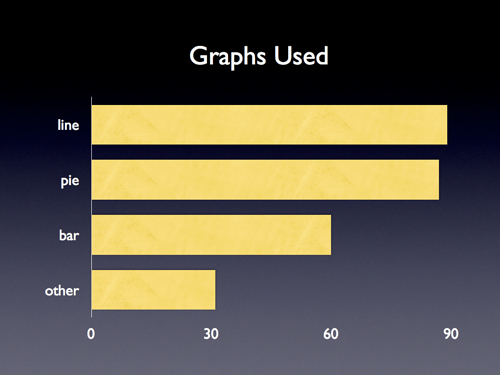
Nicholas Felton is a graphic designer working in New York City who, every year since 2005, has produced an annual report – everything from where he traveled to what he drank – using infographics which I’m pretty sure he stole from my math classes. His work inspired this blog’s annual report contest, which you’ll see again at the end of 2008. His annual report also inspired my classroom assignment, The Feltron Project. After struggling with my students to reproduce his accomplishment, I had several questions, which Felton was gracious enough to answer.
Dan Meyer: Can you describe your workflow, from (eg) a day’s subway ride to its appearance as an infograph in your final report? What hardware and software shows up along the way?
Nicholas Felton: As I’m in front of my computer for most of the day, I use the mac’s calendar application to keep track of all the day-to-day statistics. I arrive in the office, and immediately note anything of importance from the night before and the current morning. If I am away from the machine, or I am accumulating too many specific notes to keep track of, I will use the notepad in my mobile phone to write them down, or email them to myself. If I’m travelling, I tend to use my sketchbook to keep tabs on everything, which I will later enter into the calendar. For more infrequent activities, I also keep running lists in excel or on backpackit.com.
Throughout 2007, I also kept monthly maps of Brooklyn and Manhattan on which I traced the streets I walked each day.
DM: How much math goes into the final product? My best guess, for the record, is that you use Excel to turn (eg.) pie chart percentages into degrees and then pull that information into InDesign or Illustrator.
NF: A lot, a lot, a lot of adding. A lot of dividing by 365. A lot of multiplying by 360.
Nearly everything goes through a spreadsheet before it goes into the report, but none of the math is terribly complicated…. mostly calculating percents and angles (I should use excel, but I do this with a calculator). I have used an online tool that will output the diameter and radius of a circle if you provide the area, which has proved useful, but I don’t believe I’ve applied it to my annual reports.
DM: My students were somewhat shocked you spend only 20.6 minutes per day (as reported in your 2007 Annual Report) recording these piles of data. What corners have you cut to save time?
NF: Actually, that measurement was 20.6 measurements each day in 2007. I don’t know what it’s corollary in minutes would be, but certainly less than 20. My best guess is that I only spent between 5 and 10 minutes a day on notation. But 2007 was the most complex year of datalogging thus far, and I ultimately found that I had too much… which bogged down the tabulation and design process. This year I’ve decided to refocus my data collecting in a way that only requires a couple minutes on most days, but occasionally gets much much more complicated.
DM: How much of your final report comprises data you have PASSIVELY collected, data generated from last.fm’s music service, for example? What other sources do you use?
NF: Unfortunately, not enough data comes from passive sources yet… probably less than 10% of last year’s report was captured in that way. As you mention, last.fm keeps tabs on all my listening through itunes and my ipod. I let netflix keep track of the movies I rent, and flickr tracks how many people have viewed my photos. I have also purchased weather records for New York City, which I augment with out of town records for the last 2 years in order to help determine my average temperature as well as the maximum and minimum.
DM: My students didn’t have much trouble making infographs but the designs didn’t stray much beyond Microsoft templates. What essential advice would you give a high school freshman for creating a compelling design?
NF: Reduce, reduce, reduce. I find that you can eliminate nearly all the elements that Microsoft wants to include in a graph with considered editing and placement. In most cases, I can get away with eliminating a key or an entire axis altogether.
DM: My students are quick to accuse anyone of your dedication of having “no life” or “too much time on his hands.” Aside from the obvious intrinsic value you get from this project, do your reports benefit you tangibly? What do you get out of this?
NF: For the record, I prefer to consider myself curious or inquisitive, rather than the victim of dull circumstances. The truth is that the more I do, the more interesting I find the reports to be. Like everyone, I tend to be a creature of habit, so it’s the outliers of activity that interest me. I am indebted to the project for a host of benefits. Without the report, I wouldn’t have a very good reason for counting how many coffees I drank in a year, which truly intrigues me. The additional acclaim the report has received is terrific and has helped me forge a name for myself in a crowded field of talented graphic designers, leading to more commissions, as well as a refocussed dedication to continuing the project.
DM: Can you preview any new statistics you’re tracking for your 2009 Annual Report?
NF: I’d rather surprise you in January…
[photo by Ellen Warfield]