Category: tech enthusiasm

Total 120 Posts

Tools For Socialized Instruction Not Individualized Instruction

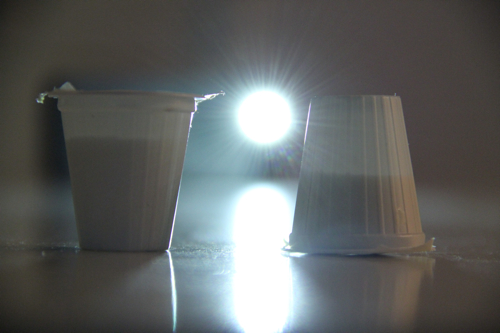
PearDeck is technology you should try out. Here’s how it works. Let’s say this image fascinates me:

140618_1lo

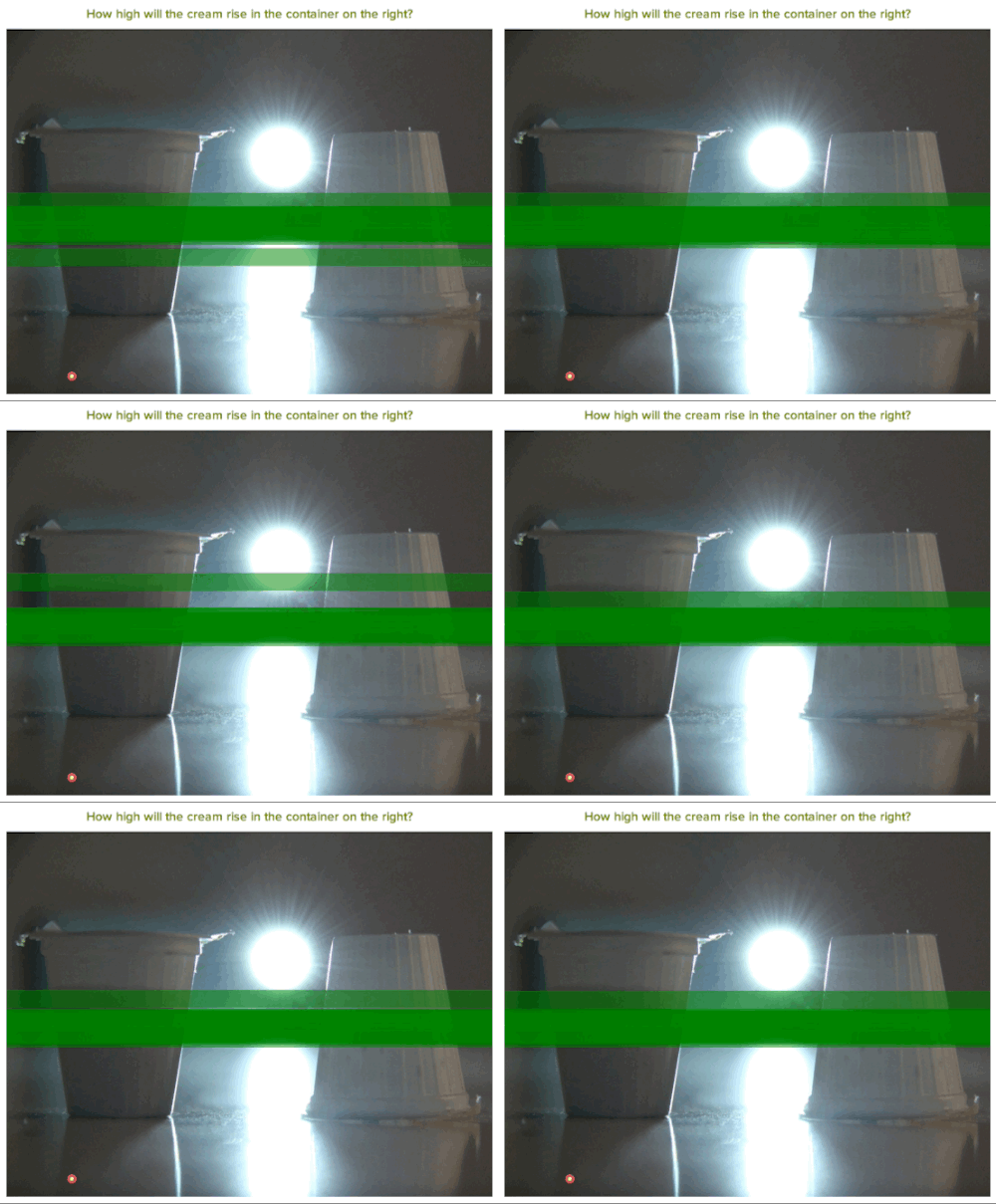
It takes a certain amount of spatial skill to answer the question, “How high will the creamer be in the upside-down container? Will it be higher than the original? Lower? The same?” (I mean the volume is the same, after all.)

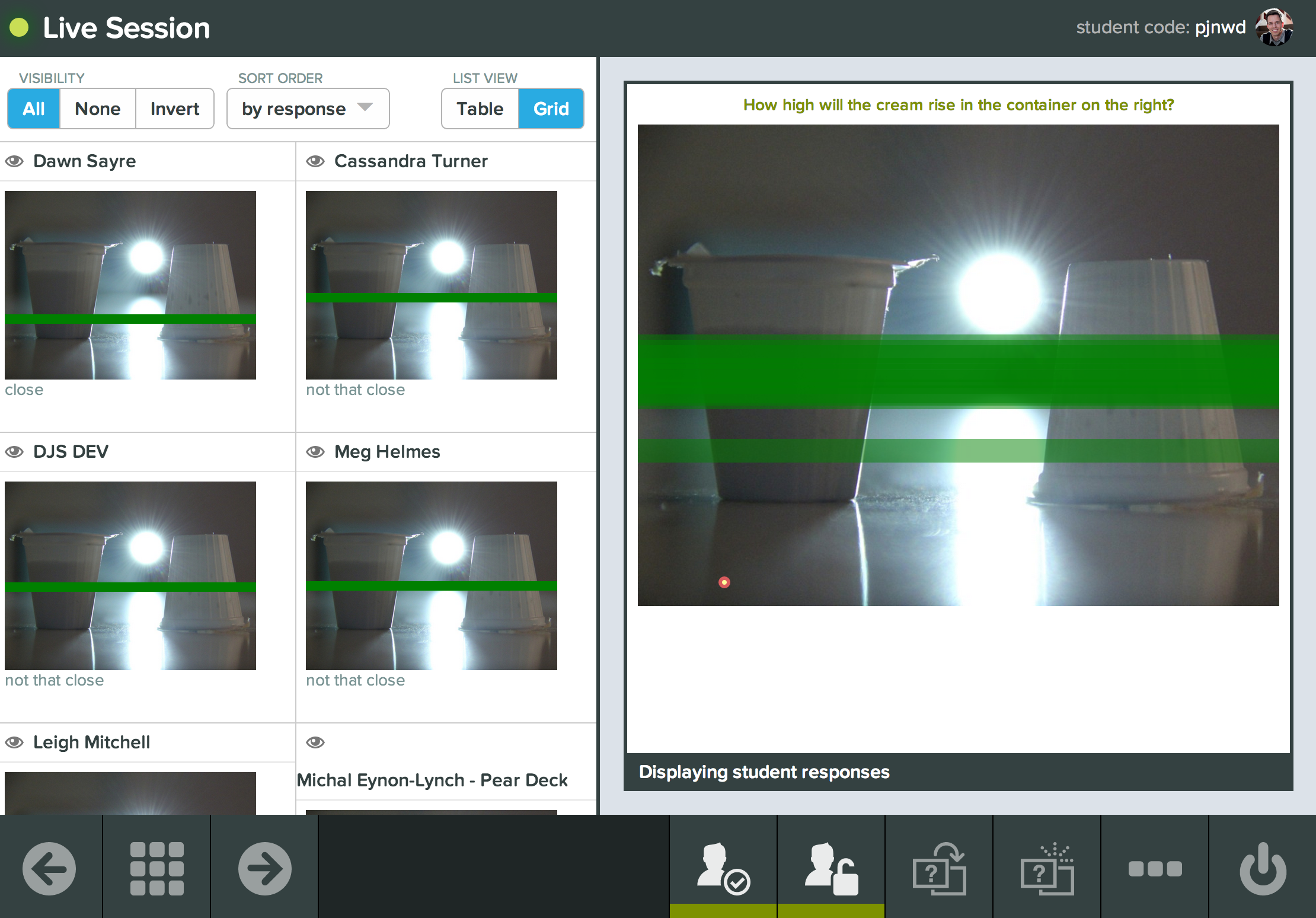
So I create a new PearDeck presentation and send the link out on Twitter asking just those questions. PearDeck then lets me capture the feedback of these students in realtime.

140618_3

The teacher interface expands to let me know whose answers are close or not that close.

140618_4lo

This sets me up for anything from an explanation of how to calculate solids of revolution in Calculus or a debate about covariation in Algebra.

If you’re an educational technologist and you think this is interesting, please notice that this is the opposite of individualized instruction. It’s socialized instruction. PearDeck would be much less interesting if you were the only person estimating, or if you were answering the question “Will it be higher or lower or the same?” alone.

Sometimes learning is less fun when you’re learning at your own pace.

(The answer.)

The Most Interesting Use Of Educreations

140514_1

Before this last week’s OAME conference in Toronto, I’d only seen one use of Educreations: students record themselves teaching through a lesson or a problem as a kind of summative assessment. This assignment has been recommended to me in 100% of the tablets-in-education sessions I’ve attended. (Chris Hunter called the students “Khanabees,” which is clever.)

In her session at OAME, Marian Small used Educreations to show student thinking in its raw, unrehearsed form, full of loops and self-references, which for some purposes is more interesting than the polished Khanabees presentations.

The premise of her talk (PDF of her slides) was that the job of teaching comprises two very different, very difficult tasks:

  1. promoting student thinking through interesting questions,
  2. responding to that thinking in productive ways.

So her session was simple, but engrossing.

  1. She had students talk through and work out on an iPad interesting questions that they were seeing for the first time. (Here’s an example.) The iPad recorded their real-time sketches and markings and paired it to the their voice.
  2. She asked us what we’d say next and analyzed and critiqued our responses, highlighting their differences and categorizing them as either “scaffolding,” “redirecting,” “probing,” or “extending.”

An hour flew by.

This approach to representing student work has advantages and disadvantages relative to both scans of student work and videos that show the student and teacher. Rather than outline those differences myself, I’d rather take your thoughts in the comments.

If you’re into Talking Math With Your Kids or Math Mistakes, this approach to student work is worth investigating.

Featured Comments

Kate, referring to Small’s two bullet points above:

That is the most beautiful job description I’ve ever read.

Ryan Muller:

I am not a teacher, but as a technologist/researcher, it strikes me we can, at least in the short run, have a lot more pedagogical insight with humans looking at a few these than machines crunching context-poor big data (even though I’ve argued the case of the latter before on this blog).

Wade Roberts, co-founder of Educreations:

Android is the next logical platform for us to support, but we don’t yet see sufficient demand to justify the cost of development. We’re monitoring Android tablet growth within schools, but iPad is still over 90% of school market. It is already possible to replay our videos on Android, however.

And:

We’re incredibly excited about this use-case. People are often surprised when I tell them that just over half of the 5 million videos on our platform have been created by students.

Motion Math: Pizza!

I caught Motion Math’s latest game at their booth at NCTM. It’s pretty irresistible. Kids are in the pizza business. They get to name their pizzas whatever they want, create them with whatever ingredients they want, and sell them for whatever price they want. Then the game goes all Sim-like on the kid. Customers come in and start buying up pizzas. The student practices multiplication at the cash register. Eventually the day is done and the student tallies up her profit or loss.

The game builds in just enough market behavior to make it a fun introduction to running your own business but not so much market behavior you’re collecting W-9s from your employees or dealing with health inspectors. Customers get annoyed if you price your pizzas too high. You run out of pizzas if you price them too low. They request new ingredients, which you can go buy at the market.

It’s great math and great gameplay from one of my favorite game designers in math education. Highly recommended.

Featured Tweet

Featured Comment

Bowen Kerins:

This game is terrific, with plenty of variety and thoughtful math. There’s even work on unit rates available when a second vendor opens, and one is offering 20 sardines for $4 while the other offers 90 sardines for $20.

Waterline & Taking Textbooks Out Of Airplane Mode

tl;dr – This is about a new digital lesson I made with Christopher Danielson and our friends at Desmos. It’s called Waterline and its best feature is that it shares data from student to student rather than just from student to teacher. I’ll show you what I mean while simultaneously badgering publishers of digital textbooks. (As I do.)

Think about the stretches of time when your smartphone or tablet is in airplane mode.

Without any connection to the Internet, you can read articles you’ve saved but you can’t visit any links inside those articles. You can’t text your friends. You can’t share photos of cats wearing mittens or tweet your funny thoughts to anybody.

In airplane mode, your phone is worth less. You paid for the wireless antenna in your tablet. Perhaps you’re paying for an extra data plan. Airplane mode shuts both of them down and dials the return on those investments down to zero.

Airplane mode sucks.

Most digital textbooks are in airplane mode:

  • Textbooks authored in Apple’s iBooks Author don’t send data from the student’s iPad anywhere else. Not to her teacher and not to other students.
  • HMH Fuse includes some basic student response functionality, sending data from the student to the teacher, but not between students.
  • In the Los Angeles Unified iPad rollout, administrators were surprised to find that “300 students at three high schools almost immediately removed security filters so they could freely browse the Internet.” Well of course they did. Airplane mode sucks.

The prize I’m chasing is curriculum where students share with other students, where I see your thoughts and you see mine and we both become smarter and life becomes more interesting because of that interaction. That’s how the rest of the Internet works because the Internet is out of airplane mode.

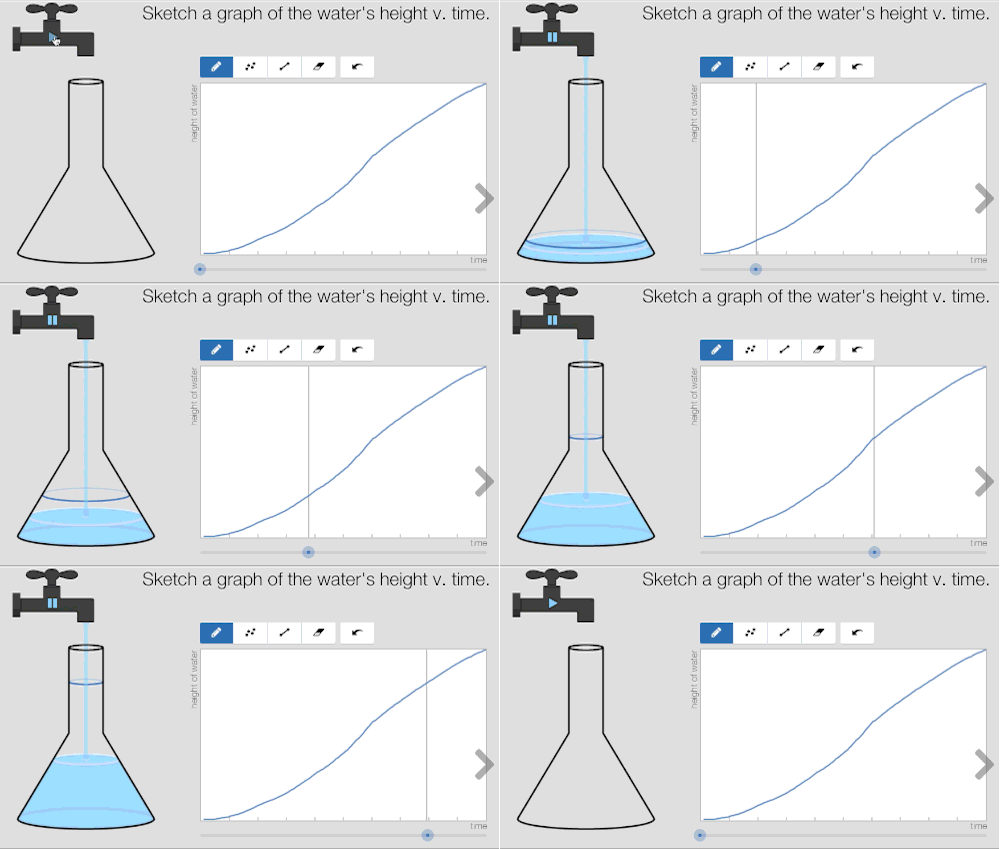
Here’s one example. In Waterline we ask students first to draw the height of the water in a glass against time. We echo their graph back to them in the same way we did in Function Carnival.
140416_1

But then we ask the students to create their own glass.

140416_2

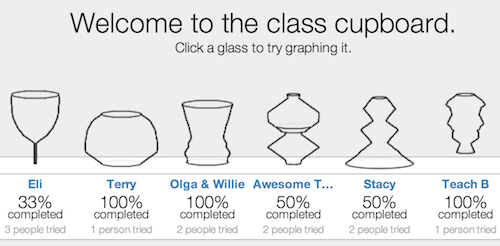
Once they successfully draw the graph of their own glass, they get to put it in the class cupboard.
140416_3

Now they see their glass in a cupboard right alongside glasses invented by their friends. They can click on those new glasses and graph them. The teacher sees all of this from her dashboard. Everyone can see which glasses are harder to graph and which are easier, setting up a useful conversation later about why.

We piloted this lesson in a local school and asked them what their favorite part of the lesson was. This creating and sharing feature was the consensus winner.

A selection:

  • Making my own because it was my own.
  • Trying to create your own glass because you can make it into any size you want.
  • Designing my own glass because I was able to experiment and see how different shapes of the glass affects how fast the glass filled up.
  • My favorite part of the activity was making my own glass and making my other peers and try and estimate my glass.
  • My favorite part of the activity was solving other people’s glasses because some were weird shapes and I wanted to challenge myself.

Jere Confrey claimed in her NCSM session that “students are our most underutilized resource in schools.” I’d like to know exactly what she meant by that very tweetable quotation, but I think I see it in the student who said, “I also liked trying out other’s glasses because we could see other’s glasses and see how other people solved the problem.”

I know we aren’t suffering from too many interactions like that in our digital curricula. They’re hard to create and they’re hard to find. I also know we won’t get more of them until teachers and administrators like you ask publishers more often to take their textbooks out of airplane mode.

Feedback From Computers Doesn’t Have To Be Boring

David Cox sent his students through Function Carnival where they tried to graph the motion of different carnival rides. (Try it!)

Every student’s initial graph was wrong. No one got it exactly right the first time. But Function Carnival doesn’t display a percent score or hint tokens or some kind of Bayesian probability they’ll get the next graph right. It just shows students what their graph means for that ride. Then it lets them revise.

David Cox screen-recorded the teacher view of all his students’ graphs. This is the result. I love it.

BTW. I’m hardly unbiased here, having played a supporting role in the development of Function Carnival.